

I’ve been checking Google Search Console for as long as it has existed (back when it was called Google Webmaster Tools). One of my oldest habits is scrolling through the Queries report looking for blog post ideas. If people are finding my site through a search I haven’t written about yet, that’s a gift. Write the post, match the search, grab the traffic.
A few days ago I almost did exactly that. Then I realized the searches I was about to write for weren’t really searches.
They were my own AI tracking prompts.
This post is a heads-up. I don’t have a clean fix to offer, but I think every site owner, blogger, and SEO should know this is happening before making decisions based on GSC data alone.
What I Found in Google Search Console
I was reviewing the last 7 days of data for OpinionCamp.com, a WordPress poll plugin site. The site is new, so the numbers are small: 165 impressions, 0 clicks.
While scanning the Queries tab, two queries jumped out:
- “can you add a poll inside a gutenberg block” (8 impressions)
- “wordpress poll plugin that does not slow down my site” (5 impressions)
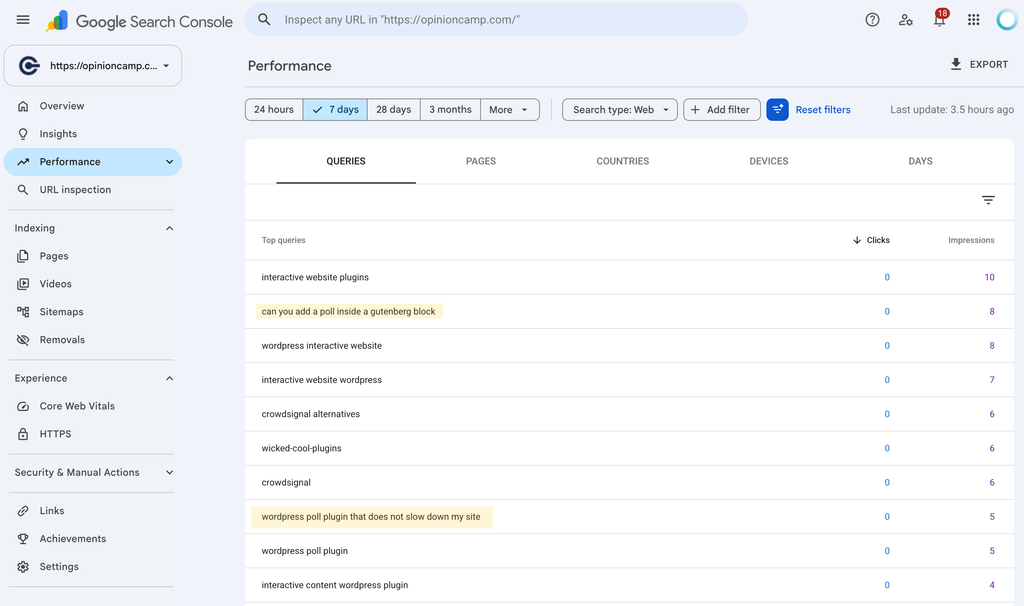
To an SEO, these look like gold. They’re long, specific, and full of intent. Someone clearly has a real problem, and a blog post answering it seems like an easy win. I had already started planning the posts in my head.
Then something felt familiar about the wording.
Where Those Queries Actually Came From
We track how often OpinionCamp shows up in AI answers using OptimizeCamp, an AI visibility tool we built. It runs a set of prompts across ChatGPT, Google AI Overviews, and Perplexity on a schedule, and shows whether the brand is mentioned or cited.
When I opened our prompt list, there they were. Word for word.
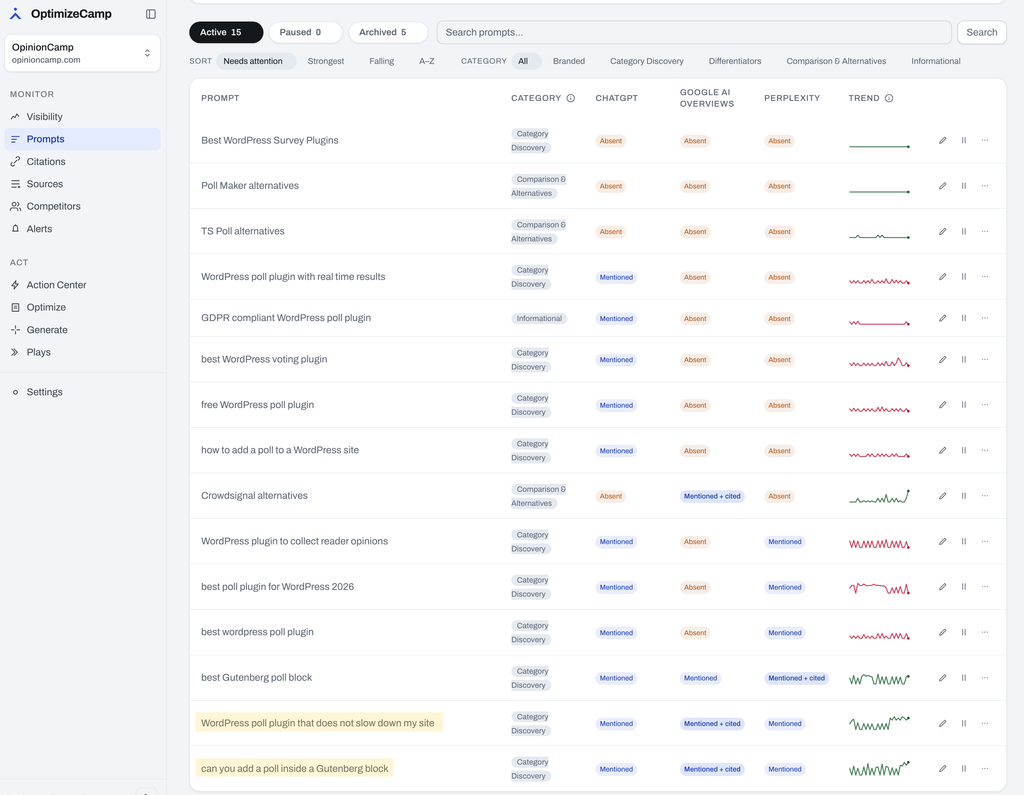
But not every match was a tracker. “Crowdsignal alternatives” is also one of our tracked prompts, and it shows up in GSC with 6 impressions. The difference? We have a blog post written specifically for that topic: a better alternative to Crowdsignal for WordPress. So those impressions make sense. Real people search for Crowdsignal alternatives, and Google shows them a page built to answer exactly that.
The two long queries were different. We have no page about adding a poll inside a Gutenberg block, and no page about poll plugins slowing down a site. Nothing on our site was built to rank for them, yet they showed up with steady impressions every day. Those are the ones that most likely came from the AI tracking tools, not from real people looking for answers.
Why This Happens (In Plain Language)
To understand this, it helps to know what an “impression” actually means in Search Console.
According to Google, an impression is generally counted when a link to your site appears in the search results someone loads. The person doesn’t have to scroll down to it, notice it, or care about it. If your page is on the results page, that’s an impression.
Now think about how AI visibility tools work. To check whether your brand appears in Google’s AI Overviews, a tool has to run a real search on Google, the same way a person would. Google loads the results page, and if your site is anywhere on it (including inside the AI Overview), Search Console records an impression.
No human saw it. No human was looking for anything. A tool asked the question, collected the answer, and moved on. The next day it did it again, and the day after that.
That also explains the pattern I saw: steady impressions every day, zero clicks. Trackers check results. They don’t click on them.
This isn’t a brand new problem, either. In September 2025, Google stopped supporting a setting that many rank-tracking tools used to load 100 results at once. Right after that, lots of site owners saw their impressions drop sharply, while their average position suddenly “improved.” A big chunk of those impressions had been coming from rank trackers all along. AI visibility tracking is simply the next wave of the same thing, and it’s growing fast.
It’s Not Just Your Own Tracked Prompts
Here’s the part that worried me more.
If my tracking tool can add queries to my GSC report, so can everyone else’s.
In the poll and survey space alone, other plugin makers, agencies, and SEO tools could be tracking questions close to ours. If our site appears in their results, those searches land in our Search Console too. I have no way of knowing which ones. And that’s the core problem: you can rule out your own prompts because you know them, but you can’t rule out prompts you’ve never seen.
Think about how many companies in any niche track prompts today. In the poll and survey space alone, other plugin makers, agencies, and SEO tools could be tracking questions close to ours. If our site appears in their results, those searches land in our Search Console too. I have no way of knowing which ones. And that’s the core problem: you can rule out your own prompts because you know them, but you can’t rule out prompts you’ve never seen.
Clues That a Query Might Come From a Tracker
There’s no label in GSC that says “this came from a bot.” But a few signs are worth watching for. Treat these as clues, not proof.
- You have no page that matches it. This is the easiest check. If a query lines up with a post or page you’ve actually published, the impressions probably come from real people finding that content. If you have nothing on your site built for that query, and it still shows steady impressions, be suspicious. Google usually shows your pages for searches they’re relevant to, so a query with no matching page is worth a second look.
- It reads like a question typed into ChatGPT. Real people usually search in short fragments like “wordpress poll plugin.” Tracked prompts often read like full sentences: “wordpress poll plugin that does not slow down my site.”
- Zero clicks, week after week. A real query with steady impressions usually earns at least a click now and then, especially if you rank reasonably well.
- Very steady daily impressions. Real search interest goes up and down. Scheduled tools tend to produce the same small numbers day after day.
- It appeared suddenly. If a long, very specific query shows up out of nowhere with consistent impressions, ask yourself why.
- Keyword tools show no search volume. Not perfect (keyword tools miss a lot of long-tail searches), but if a query has zero volume everywhere and still shows steady impressions in GSC, that’s a hint.
Quick tip: you can spot long, conversational queries faster with a filter. In the Performance report, click “Add filter,” choose “Query,” switch to “Custom (regex),” and paste this:
(\S+\s+){6,}\S+
This shows only queries with seven or more words. Look through them with the clues above in mind.
One important note: a query can be both. Real people may type the exact same thing a tracker does. So even a “suspicious” query isn’t fully fake. It’s just mixed, and you can’t tell how much of it is real.
Why This Matters
A few inflated impressions might not seem like a big deal. But GSC data drives real decisions, and bad inputs lead to bad decisions.
- Writing content for searches nobody made. This is exactly what I almost did. Two blog posts, hours of work, aimed at “demand” that came from my own tool.
- Creating docs or pages for fake questions. Many teams use GSC queries to decide what to add to documentation, FAQs, or help centers. Tracked prompts can send them in the wrong direction.
- Building product decisions on the wrong signal. A query like “poll plugin that does not slow down my site” could easily look like a feature request. It might be one. Or it might be a tracker.
- Reporting inflated growth. If you report impressions to a client or your boss, tracker traffic can make visibility look better than it really is. When the tools change, those numbers can drop overnight, and you’ll be explaining a “decline” that was never real.
- Misreading click-through rate. Lots of impressions with no clicks makes your CTR look terrible. You might rewrite titles and meta descriptions to fix a problem that doesn’t exist.
What to Keep in Mind
I want to be honest here: I don’t have a fix. There’s currently no way to separate tracker searches from human searches inside Search Console. But a few habits can keep you from being misled.
- Treat GSC as one signal, not the final answer. It’s still one of the best free tools we have. Just don’t let it be the only reason you make a decision.
- Cross-check with other sources. Before writing a post based on a GSC query, look at keyword tools, support tickets, customer emails, community forums, and Reddit threads. If real people are asking the question in those places too, you’re on solid ground.
- Trust clicks more than impressions. A click almost always means a real person. An impression might not.
- Be extra careful with long, conversational queries. These are exactly where tracker prompts hide.
- Know your own tracked prompts. If you use any AI visibility or rank-tracking tool, keep a list of what it tracks, and compare it against your GSC queries from time to time. At least you can rule those out.
Final Thoughts
Search Console still tells you a lot about how people find your site. I’ll keep checking it, and I’ll keep finding post ideas in it.
But the days of trusting every query and every impression are over. More and more of what shows up in GSC may come from tools asking questions, not people. That includes your tools, your competitors’ tools, and tools you’ll never know about.
So the next time a perfect-looking query shows up in your report, pause for a second before you open a new draft. Ask: did a person search for this, or did a tool?
Have you noticed anything similar in your own Search Console? I’d love to hear what you found.
Leave a Reply